


Oji: AI Avatar Photo Generator
4.3402.00 Reviews
App Specs
- Version
- 1.18.4
- Updated On
- License
- Free
- Downloads
- 1,000,000+
- Developer
- Prequel Inc.
- Categories
- Art & Design
- Platform
- Android
Screenshots
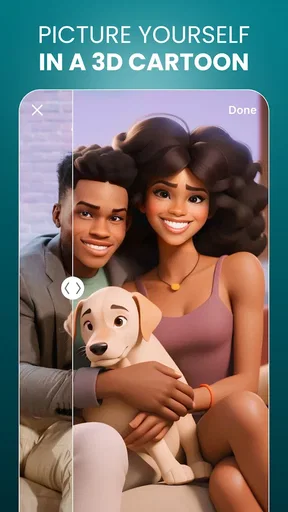


 Analysis by AppCompare
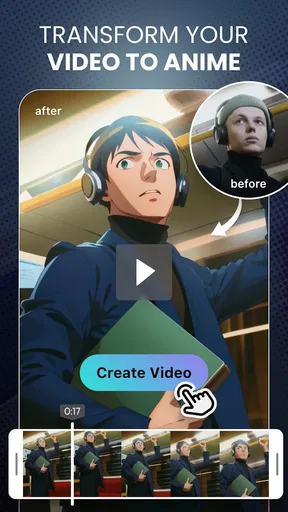
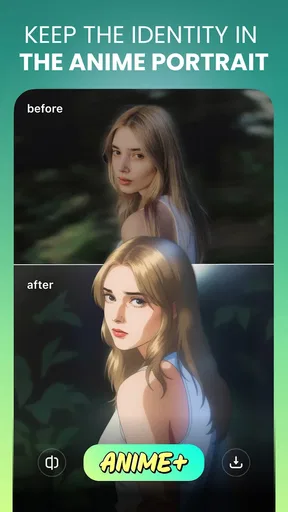
I like avatar apps most when they give me a quick way to try a different look without turning a simple photo into a long editing project. Oji: AI Avatar Photo Generator is aimed at that kind of creative experiment: it can take a selfie in a realistic direction or make it feel more like a cartoon or anime portrait. I’d treat it as a playful tool for refreshing a profile image, testing a visual idea, or making a picture to share—not as a replacement for careful portrait editing.
Free to try, with paid extras to weigh
Oji is a free art-and-design app from Prequel Inc., with in-app purchases ranging from $1.99 to $39.99 per item. That makes the basic decision easy: you can start without paying, then decide whether any paid option is worth it to you. The range is wide enough that I would check the exact item and its price in the app before buying, rather than assuming every style or tool is included for free.
There is a practical difference between trying an avatar generator once and using it regularly. If you only need one new profile picture, free access may be enough to find out whether the results suit you. If you enjoy cycling through looks for different accounts or occasions, a paid item could be more tempting—but its value depends on what it unlocks and how often you will use it. I wouldn’t spend just because a particular preview looks appealing; first compare the finished result with the free options you have already tried.
Making a selfie feel like a new portrait
Oji is listed for Teen users, has an average rating of 4.3 from around 23,000 ratings, and has passed over a million installs. Its current version is 1.18.4, and it was released on May 11, 2023. Those details give a sense of an established app, but they don’t tell me whether a specific style will suit your face or whether you’ll like the results. The useful test is still to try a clear photo and judge the output for yourself.
First impressions and setup
Diving into Oji: AI Avatar Photo Generator is a breeze. The app is available on both Android and iOS platforms, making it accessible to a wide audience. After downloading it, I was greeted with a clean and intuitive interface. The setup process is straightforward—just a few taps and you’re ready to explore.
What struck me first was the simplicity. You don’t have to wade through complicated menus or settings. Just upload a photo, and the app’s AI does the rest. It’s perfect for someone like me who loves tech but doesn’t always have the patience for overly complex apps.
Choosing a photo and judging the result
The input photo matters more than it might seem. For a first attempt, I’d choose a well-lit, front-facing selfie with your face unobstructed, rather than a group shot or a picture with a strong shadow. That gives an avatar generator a clearer starting point and makes it easier to tell whether a style itself works for you. If the first result feels off, I’d change the source photo before deciding the app cannot produce a look you like.
Worth Reading Before You Choose

EA SPORTS FC Mobile 26 Is a Bigger Football Game, but It Takes Time

Flipboard Shows What News Apps Must Do Beyond the Feed

Switching to Android Auto Means Rethinking Your Driving Routine

Google Calendar Makes a Crowded Week Easier to Manage

Ludo King Makes the Most of the Minutes Between Plans

Baby Panda World Brings Quick Play to Modern Phones, but Its Game Library Feels Busy
It also helps to compare styles using the same portrait. That way, you’re judging the change in artistic treatment instead of wondering whether a different expression or camera angle caused the difference. I’d save only the versions that feel useful, such as one that reads clearly at a small profile-image size and another with more visual flair for sharing. A striking full-screen result can lose detail when cropped into a circle, so checking the crop before settling on a profile picture is a worthwhile final step.
Features that stand out
The core feature of Oji is its ability to transform your photo into a stunning AI-generated avatar. It provides a variety of styles to choose from—anything from cartoonish renditions to more realistic interpretations. I tried a few different styles and was impressed by the app’s versatility.
One of the standout features is the customization options. While the AI does a fantastic job on its own, you can tweak details to your liking. Adjusting elements like facial expressions and hairstyles is as simple as dragging a slider. It’s these little touches that make the app feel personal.
Where it fits in a normal day
A realistic use for me would be getting a new profile picture ready before updating a messaging account or joining a group with a more playful theme. I could take a selfie in decent daylight, try a realistic treatment for a familiar look, then compare it with a more illustrated option. If neither feels right for a professional profile, I’d keep my original portrait rather than forcing an AI version into a setting where recognizability matters more than novelty.
Oji is also better suited to quick creative exploration than to a precise design brief. If I wanted a consistent set of portraits for a team, a brand, or a project that needs exact colors and composition, I’d use an editor that gives me more direct control. The appeal here is the short path from photo to a new interpretation; the trade-off is that generated results are not the same as building every detail by hand.
Performance and usability
In terms of performance, the app is swift and responsive. The process of generating an avatar is quick, usually taking less than a minute. Even when experimenting with various styles and adjustments, I didn’t encounter any lag. It’s clear that the developers have optimized the app for a smooth user experience.
Usability is another area where Oji shines. The design is user-friendly, with clear icons and instructions. Whether you’re tech-savvy or a complete novice, navigating the app is a breeze. Plus, the results can be easily saved to your device or shared directly to social media platforms.
Trade-offs compared with other creative apps
Compared with a general photo editor, Oji’s strength is its focused avatar-making process. A traditional editor is usually the better choice when I want to retouch a small detail, preserve a specific background, or control the final composition precisely. Oji is more appealing when I want the app to reinterpret my portrait and present me with a different visual direction. Those are different jobs, so I wouldn’t choose one expecting it to replace the other.
It also occupies a different space from drawing apps. If you want to make an illustration from scratch or refine line work yourself, a canvas-based art tool gives you more authorship. With Oji, the enjoyable part is trying transformations and selecting a result, while the limitation is that the creative process begins with a photo and the app’s available treatments. That makes it approachable for someone who doesn’t draw, but less satisfying for an artist who wants detailed control.
For the best chance of a useful result, I’d avoid changing several things at once. Start with one portrait and one style, see what the app does, then adjust a detail if the result is close but not quite right. This makes it easier to tell whether a customization helped. It also avoids spending time on a version that was never a good match for the source image.
Potential for creativity
What I love most about Oji is the creative potential it unlocks. This app isn’t just about creating avatars; it’s about exploring different artistic expressions. I found myself experimenting with various combinations, each time being pleasantly surprised by the outcome.
The app also encourages creativity by offering themed avatar packs. These are perfect for those looking to match their avatar with a particular mood or occasion. It’s a fun way to inject some personality into your digital identity.
The app is at its best when you treat the result as a starting point for expression rather than a perfect substitute for a photograph. A stylized portrait can give a profile a distinct tone, while a realistic treatment may be more suitable when you still want friends to recognize you immediately. I’d decide where I plan to use the image before choosing a style, because the most dramatic option is not automatically the most practical one.
Who is likely to get the most from it?
I’d recommend trying Oji if you enjoy changing your online look, want an accessible way to explore anime- or cartoon-inspired portraits, or simply like seeing how a selfie changes under different visual treatments. It is especially appealing if you’d rather choose a style and make a few adjustments than learn a full editing workflow. The free entry point also makes it reasonable to test the experience before deciding whether to spend on an in-app item.
I’d skip it if your main goal is a faithful, carefully retouched headshot, a highly controlled illustration, or a dependable set of matching images for work. In those cases, a conventional photo editor, a professional portrait workflow, or a drawing tool may serve you better. I’d also be cautious about using an AI-styled face where identity needs to be unmistakable; keep a regular photo available for accounts where clarity matters.
Final thoughts
Overall, Oji: AI Avatar Photo Generator is a delightful app that combines ease of use with powerful AI technology. It’s perfect for anyone looking to create a unique avatar without diving into complex editing software. The level of customization and the quality of the generated avatars make it a standout choice among similar apps.
Whether you’re using it for personal fun or to enhance your online presence, Oji offers a fun and innovative way to express yourself. It’s safe to say that I’ll be coming back to this app whenever I need a fresh digital look. So go ahead, give it a try—your next favorite avatar is just a tap away!
Pros
- Creates stunningly realistic avatars.
- User-friendly interface for easy navigation.
- Wide range of customization options.
- Quick processing time for avatar creation.
- Share directly to social media platforms.
Cons
- Limited free features
- requires in-app purchases.
- Occasional glitches during image processing.
- Avatars can look similar without tweaks.
- High battery usage during prolonged use.
- Requires stable internet for best results.
FAQs for Oji: AI Avatar Photo Generator
What is Oji: AI Avatar Photo Generator?
Oji: AI Avatar Photo Generator is an innovative app that allows users to create personalized avatars using advanced AI technology. You can upload a photo, and the app generates a unique avatar that reflects your features in a creative and artistic style. It’s perfect for social media profiles, gaming, and more.
How does the AI avatar creation process work?
The process is straightforward: you upload a clear photo of yourself, and Oji’s AI analyzes the image to generate an avatar. The app provides various customization options, allowing you to adjust features and styles to suit your preference. The result is a digital avatar that captures your likeness in a fun and engaging way.
Is Oji: AI Avatar Photo Generator free to use?
Oji offers a free version with basic features, but there are also premium options available for purchase. These premium features include advanced customization tools, additional avatar styles, and removal of ads. Subscribing to the premium version enhances the user experience by providing more creative flexibility.
Can I use the avatars created with Oji for commercial purposes?
Avatars created with Oji are primarily for personal use, such as social media profiles or gaming. If you plan to use them for commercial purposes, it’s essential to review Oji’s terms of service or contact the developer for more information. Licensing agreements may apply for commercial use.
What privacy measures does Oji implement for user data?
Oji prioritizes user privacy by implementing secure data encryption and strict privacy policies. Uploaded photos are processed securely, and the app does not store personal images without user consent. It’s advisable to review the privacy policy to understand how your data is managed and protected.


